Most people can edit a Google Doc. Delete some words, rearrange sentences, fix typos, add paragraphs. It's intuitive and requires no special training. Now imagine editing video the same way. That's Descript's core innovation, and it transformed video editing from a specialized skill requiring expensive software into something anyone who can edit text can do effectively.
From Audio Transcription to Video Powerhouse
Descript started as a transcription tool for podcasters. Record your podcast, upload it to Descript, and get an accurate transcript for show notes. But the founders realized something bigger. If you have a perfect transcript synchronized to audio, you can edit the audio by editing the text. Delete a word from the transcript and that word disappears from the audio. That insight became the foundation for a complete editing platform.
How Text-Based Editing Actually Works
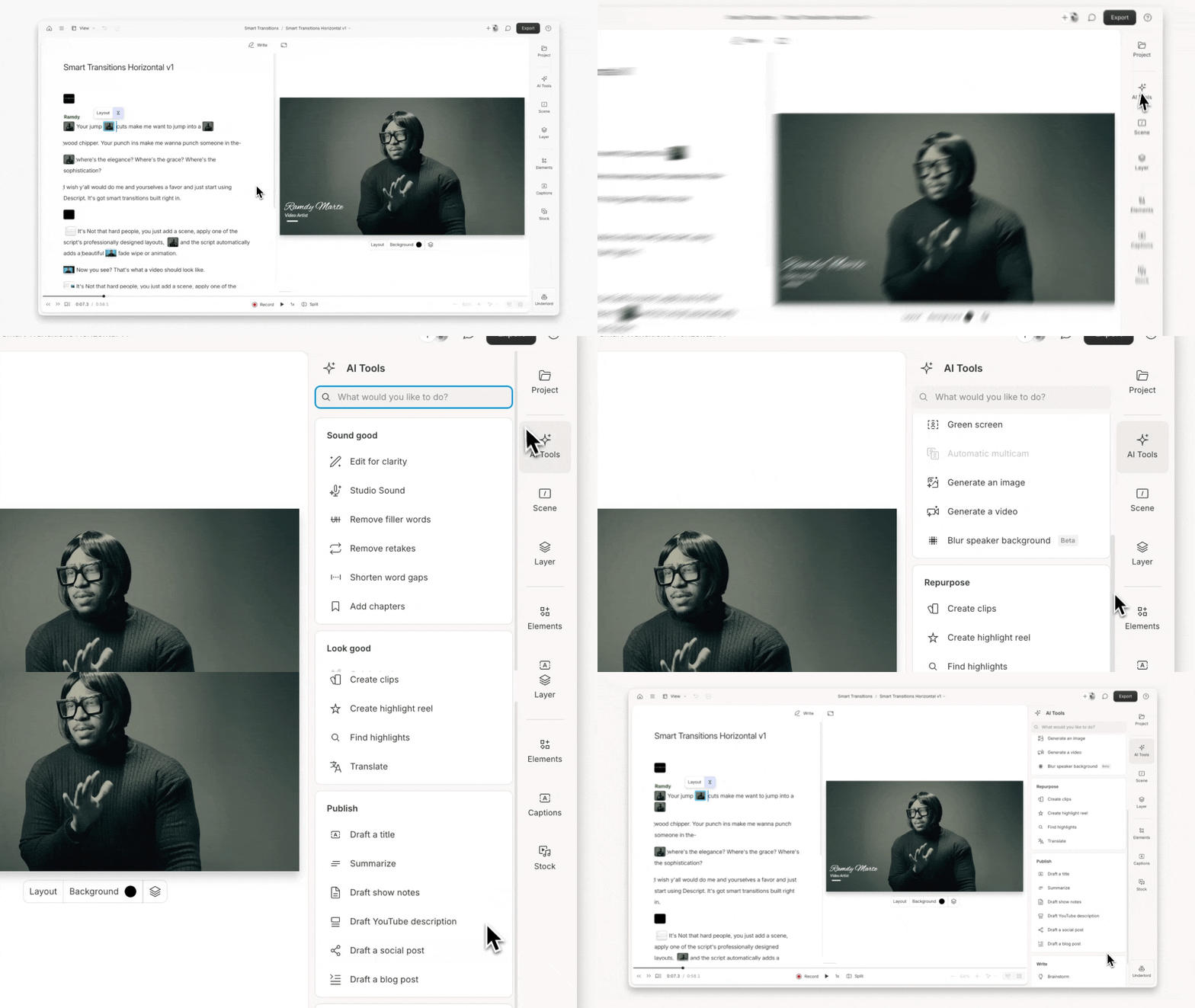
Import a video or audio recording into Descript. The AI automatically generates a transcript with speaker identification. The transcript appears alongside your media timeline, perfectly synchronized. To remove a mistake, you highlight the words in the transcript and press delete. The corresponding video disappears instantly. Want to rearrange sections? Cut and paste text like you would in a document. The video reorders automatically.
This workflow removes the learning curve that makes traditional video editing intimidating. You're not manipulating timelines, adjusting playheads, or managing layers. You're editing text. Every content creator who's ever written can immediately understand how to use Descript.
Automatic Filler Word Removal
Most people say "um," "uh," "like," and "you know" constantly while speaking. Professional speakers and experienced presenters minimize these filler words, but most of us use them unconsciously. Traditional editing required listening through footage, marking each filler word, and manually cutting them out. Descript's AI detects filler words automatically and can remove all of them with a single click.
The time savings are substantial. A 30-minute interview might contain hundreds of filler words. Manual removal takes hours. Automatic removal takes seconds. The feature alone justifies the subscription for many podcasters and video creators who value polish but hate tedious editing.
Overdub Voice Cloning for Corrections
The Overdub feature lets you clone your voice and generate new audio without re-recording. Made a mistake or need to add a sentence? Type what you want to say, and Overdub generates it in your cloned voice. The new audio blends seamlessly with your original recording, matching tone, pace, and vocal characteristics.
This capability changes the economics of recording. Previously, any mistake required re-recording the entire section to maintain audio consistency. Now you fix mistakes by typing corrections. Creators can record more confidently knowing that small errors don't require complete retakes.
Studio Sound Audio Enhancement
The Studio Sound feature applies professional audio processing to clean up recordings. Remove background noise, echo, and audio artifacts with one click. The AI understands what constitutes good speech audio and enhances your recordings to match broadcast quality standards. Recordings made in noisy environments or with mediocre microphones can sound like they were captured in professional studios.
Video Effects and Templates
Beyond basic editing, Descript includes templates for common video formats. Lower thirds for speaker identification, animated titles, outro screens, and social media formatting all come as pre-built templates. Creators apply these effects without learning motion graphics or animation principles. The templates ensure consistent branding across videos while maintaining professional polish.
Social Media Clip Generation
The AI can automatically identify compelling segments from long-form content and generate social media clips. Record a 45-minute podcast, and Descript suggests 10 shareable clips optimized for different platforms. These clips include automatic captions, proper framing for vertical video, and attention-grabbing opening moments. Repurposing long content into platform-specific clips becomes automated rather than manually intensive.
Collaboration Features for Teams
Multiple team members can work on the same project simultaneously with real-time updates. Leave comments on specific moments, assign review tasks, and track changes as projects evolve. The collaboration experience mirrors Google Docs but for video, making it natural for teams already comfortable with cloud-based workflows.
The Podcaster Adoption Wave
Podcasters were early Descript adopters and remain core users. The workflow perfectly matches podcast production needs. Record interviews, automatically transcribe, remove filler words, add intro and outro music, export to hosting platforms. Many podcasters credit Descript with making their shows sustainable by reducing editing time from hours to minutes.
YouTube Creator Efficiency Gains
YouTube creators producing regular content face constant time pressure. Daily or weekly upload schedules require efficient production. Descript helps creators maintain ambitious publishing schedules by making editing dramatically faster. Creators who previously spent full days editing now finish in hours, freeing time for other business activities.
The Course Creator Market
Online course creators produce huge volumes of video content. A comprehensive course might include 50 or 100 video lessons. Traditional editing at that scale requires hiring professional editors or accepting lower quality. Descript allows course creators to maintain high production standards while managing all editing themselves.
Pricing and Plan Structure
Descript offers a free plan with basic transcription and watermarked exports. The Creator plan at $15 monthly includes 10 hours of transcription and full editing capabilities. The Pro plan at $30 monthly adds 30 hours of transcription, Overdub voice cloning, and all features. Enterprise plans provide unlimited transcription and team collaboration tools. The pricing makes professional editing accessible to individual creators while scaling for larger production teams.
Limitations and Learning Curve
Despite the simplified interface, Descript still requires some learning for advanced features. Complex multi-camera editing, color grading, and advanced motion graphics remain easier in traditional editors like Premiere Pro or Final Cut. Descript excels at dialogue-heavy content like interviews, tutorials, podcasts, and presentations but wasn't designed to replace full-featured professional editing software.
The Competitive Moat
Descript's moat comes from the transcription accuracy and synchronization quality. Many tools offer transcription. Fewer offer perfect synchronization between text and media. Almost none offer the complete package of transcription, editing, voice cloning, audio enhancement, and social media optimization in one platform. This integrated approach creates stickiness because switching would mean adopting multiple replacement tools.
The Efficiency Testimonials
User testimonials consistently emphasize time savings. Creators report reducing editing time by 70% or more. Tasks that previously took six hours now finish in under two. For professional creators whose revenue depends on output volume, these time savings directly impact income. Publishing three videos weekly instead of one changes business economics fundamentally.
The text-based editing paradigm represents more than interface innovation. It democratizes video production by removing the technical barrier that prevented most people from creating polished video content. When editing becomes as simple as editing text, vastly more people can produce professional-quality videos. That democratization explains Descript's growth and the loyalty of its creator community.
Underlord is impressive but it still requires you to review its decisions. It occasionally removes context that matters or keeps something you would have cut. The time savings are real but it is not a one click finished product.
The automatic multicam editing feature that switches to the active speaker is something that used to require either expensive hardware or hours of manual editing. Having it work automatically from the transcript context is genuinely clever.
Worried this democratization narrative overlooks what it does to professionals. When the tool removes the skill barrier, it also removes the justification for rates that used to compensate for years of learned expertise.
My team is fully remote across three time zones and the async collaboration in Descript has been one of the biggest workflow improvements we made. Timestamped comments and shared transcripts mean nobody needs to be on the same call to review an edit.
Vibe editing is a fun framing but I hope people stay skeptical about handing full creative judgment to AI assistants. The editorial decisions that make content actually compelling are still human decisions. The AI speeds up the mechanical work.
Sora 2 inside Descript is interesting but I would not lead with that as a selling point yet. The generative video stuff is genuinely impressive for atmospheric b-roll but the restriction on human faces limits practical use cases significantly.
One thing nobody mentions: the transcript is searchable. When you have 200 episodes of a podcast you can search for any word or phrase and jump directly to that moment across your entire archive. That use case alone is worth the subscription.
What a time to be making content. The barriers keep falling and the tools keep getting better. Three years ago this workflow would have seemed like a description of something that should exist but did not yet.
The social media clip automation described here is accurate but the article makes it sound more automatic than it is. The AI surfaces candidates well but you still spend meaningful time selecting and trimming. Calling it fully automated is generous.
Ran into that performance issue too. The workaround that helped me was splitting longer recordings into segments rather than one giant project file. Bit annoying but it mostly solves the sluggishness.
Counterpoint: for anyone who already knows Premiere Pro or Final Cut, the learning curve is actually reversed. You have to unlearn instincts and stop reaching for timeline tools that are not the point anymore. Took me a few weeks to fully switch over.
The Underlord AI co-editor that launched in 2025 is the most interesting recent development. The idea of describing what you want your video to do in plain language and having the editor interpret that is genuinely new territory for this category.
The Google Docs comparison is genuinely the most accurate way to explain this to people who have never used it. Every single person I have shown it to had the same reaction, which was basically why did video editing work any other way before this.
Used Descript for the first time last month after years of Final Cut Pro. I felt slightly guilty about how easy it was, like I was cheating somehow. That guilt lasted about five minutes.
Honestly the new credit system is frustrating if you use Studio Sound a lot because each use draws down your AI credits. For heavy users it adds up faster than the old plan structure did.
Does anyone know how Descript handles footage that has really heavy background noise before Studio Sound processes it? Wondering if it still transcribes accurately or if the noise throws off the AI.
Hot take: the real innovation here is not the technology, it is the interaction design. Dozens of tools had decent transcription before Descript. Nobody made editing the actual interface until Descript did.
Been using this since the early podcast transcription days and the evolution has been remarkable. It went from a useful transcription tool to a genuine full production platform. The Rooms recording feature alone replaced another subscription for my team.
Been using Descript for course content for two years. The one thing I wish was better is the handling of screen recordings with cursor movement. The text sync works but scrubbing through that type of footage is still awkward.
The OpenAI Startup Fund backed Descript early on, which explains why the AI features feel well integrated rather than bolted on as afterthoughts. The alignment between their AI approach and the underlying product is unusually coherent.
What I appreciate is that the learning curve, while real, is front loaded. The first project takes longer than expected because the interface is genuinely new. By the third project the speed gains kick in hard.
My favorite underrated feature is actually the speaker identification in the transcript. For interview content it just knows who said what and labels it correctly almost every time.
The pricing article mentions changed in September 2025 where they switched to a Media Minutes plus AI Credits system. That shift annoyed a lot of longtime users because the old flat pricing was cleaner and easier to budget around.
Hot take: text-based editing is not a simplified version of real editing. It is a genuinely different paradigm that is better for dialogue-heavy content in almost every way.
The article mentions 70 percent editing time reduction and I was skeptical until I tracked my own numbers for a month. The actual time savings on a 30-minute interview episode was closer to 65 percent. So yeah, those claims check out.
As someone who produces online courses for a living, text-based editing completely changed my economics. I used to budget 3 hours of editing for every hour of content. Now it is closer to 45 minutes.
The transcription accuracy across languages has gotten really strong. Over 95% accuracy across more than 25 languages now. For global content teams that is a legitimate game changer.
This is the best argument for AI editing tools that nobody talks about. The confidence that errors are recoverable changes how you show up in front of the camera or microphone in the first place.
The article says Descript excels at dialogue-heavy content like interviews, tutorials, and podcasts. That is accurate and it is worth emphasizing because I have seen people frustrated trying to use it for content it was never designed for.
Text-based editing workflows now eliminate somewhere between 50 and 70 percent of manual timeline scrubbing according to most production estimates. That is not a marginal efficiency gain, that is a different job.
Yes, that YouTube import removal was annoying. The workaround of downloading through YouTube Studio first is fine but it was one of those small frictions that adds up when you are doing high volume content work.
That is a fair point on pricing but compared to what editing used to cost either in time or in hiring someone, even $24 a month is usually a strong ROI for anyone publishing consistently.
That is fair about color grading but honestly most YouTube talking head content does not need heavy grading. A decent camera with a good color profile exports fine straight from Descript for most channels.
The bigger picture here is that AI is reducing the skill gap in content creation across the board. Descript is one of the clearest examples but the same pattern is playing out in graphic design, writing, and audio production simultaneously.
My biggest complaint is the performance on longer projects. Once you are past 45 minutes or so the app can get sluggish, especially during playback after heavy editing. This has been a known issue for a while.
The collaboration feature described in the article has live cursor presence now, similar to watching teammates move through a Google Doc in real time. For remote production teams that basically eliminates a whole category of Slack messages.
The course creator use case is where I see the biggest real world impact. Building a 60 lesson course used to mean either a huge editing budget or accepting rough quality. Descript removes that trade-off entirely.
The voice cloning ethics question is one the article completely sidesteps. Overdub is disclosed as a tool to fix your own recordings but the potential for misuse is real and regulators are starting to pay attention to AI voice cloning generally.
Switched from spending money on a freelance video editor to doing it myself with Descript. Genuinely saved several hundred dollars a month on production. The time cost is higher but controllable now.
The clip finder works better than I expected honestly. It does not always pick the clips I would have chosen but it surfaces moments I would have missed, and the starting point is strong enough to refine quickly.
Not to be contrarian but $24 per month on the Creator plan adds up. For a hobbyist who publishes twice a month that is a meaningful cost, and the value calculation is different from someone doing weekly content professionally.
Wait, what about color grading though? The article kind of glosses over it as a limitation but for talking head YouTube videos a flat picture is a real problem. Descript still needs a round trip to something like Resolve for serious color work.
Descript recently added lip sync for translated and dubbed videos, which is genuinely wild. You can now translate a video, dub it into another language, and have the mouth movements matched to the new audio. That is not a small feature.
As a professional video editor I want to push back a little. Descript is a fantastic tool for its target users but the article undersells how much craft still goes into genuinely compelling video. Removing filler words is not the hard part of editing.
The free plan is genuinely useful for testing, not just a teaser. You get 60 media minutes a month and enough AI credits to actually evaluate whether the workflow fits you.
What gets me is the social clip generation. The idea that a 45-minute recording automatically becomes 10 platform-specific clips with captions and proper framing is the kind of thing that used to require a dedicated repurposing tool on top of your editor.
Understandable concern but I think the shift is more about what clients expect for a given budget than about eliminating professional work entirely. The ceiling for quality still requires human creative judgment.
The fact that small errors do not require complete retakes anymore genuinely changes the economics of recording. That point in the article about recording confidence is real. It changed how I script and prepare.
The article frames video editing as this intimidating specialized skill but honestly after a few years of creator tools democratizing everything, that barrier was already lower than this implies. Descript is still excellent though.
Tried to use Descript for a wedding highlight video once. It was comically wrong for that use case. If your content is not dialogue driven this is not your tool, and it knows that about itself.
Still not convinced the 70 percent time savings claim holds up for complex multi-guest interview content where you are making a lot of editorial decisions about structure. Simple cleanup, yes. Complex restructuring, that number feels inflated.
Real talk: the first time the filler word removal took out 200 ums from a 20-minute interview in literally three seconds I laughed out loud alone in my home office. Still kind of feels illegal.
The Overdub voice cloning is impressive but it is not magic. If your original recording has a lot of tonal variation and emotion, the cloned corrections can sound a bit flat by comparison. Worth knowing before you rely on it heavily.
To answer the question above, yes it handles noisy footage surprisingly well for transcription. The AI seems to separate speech from background before it even starts generating the text. Studio Sound then cleans the actual audio after.
Anyone else noticed that the YouTube import feature was quietly turned off? They say it is for compliance reasons but it added a step to the workflow for a lot of creators who were pulling their own content back in for repurposing.
The eye contact feature is hit or miss depending on your webcam quality and lighting. With decent setup it looks natural enough that most viewers would not notice. With bad lighting it does look slightly uncanny.
Premiere's text editing is honestly a pale imitation though. It transcribes but the sync and the editing feel nowhere near as fluid as Descript. Same idea but very different execution.
Three years ago I spent an entire Saturday editing a 20-minute podcast episode. Last week I did a 35-minute one in about 90 minutes including the transcript review and filler word cleanup. That math tells the whole story.
Multi-language support is solid. Transcription works across more than 25 languages and translation plus dubbing features are now built in. The lip sync for translated videos is a newer addition that makes dubbed content look much more natural.
The Studio Sound feature has gotten better over time. Early versions of noise reduction had this slight processed quality to them. The current model is much more transparent and the cleaning sounds natural rather than filtered.
The broader trend this fits into is the move toward what some are calling vibe editing, where you describe your creative intent and AI handles the technical execution. Descript with Underlord is the most complete example of that right now.
The enterprise team collaboration angle is undersold in creator marketing but that is actually where Descript may have its biggest growth. Marketing teams producing regular video content have the same needs as podcasters but with bigger budgets.
As a journalism educator I started showing this to students and their reaction was identical every time. Slight confusion followed by the exact moment the concept clicked followed by genuine excitement about what it means for their reporting workflow.
The fact that this started as a simple podcast transcription tool and evolved into a platform with Sora 2 generative video integration is honestly one of the better product evolution stories in creator tech.
Voice clone quality for accents varies. The model trains on your actual recordings so it captures accent characteristics, but the output is smoother than natural speech in ways that can make regional pronunciation sound slightly softened. Worth testing on your own voice.
Does anyone use Descript for short form vertical content? The article focuses a lot on podcasts and long YouTube videos but I am curious how it handles the TikTok and Reels workflow.
For short form content it works fine for basic cuts and captions but it is not optimized for the trend-responsive fast paced editing style that performs on Reels. There are more nimble tools for that specific use case.
Text-based video editing is now mainstream enough that Premiere Pro added its own version of it. That is the market signal that this approach won the argument about whether it belongs in serious production workflows.
The free plan 60 minutes per month is honestly enough to produce a solid short-form episode or a tutorial video. It is not just a demo, it is a functional tier for low volume creators.
That is fair but the goal is not to replace professional editors. The goal is to let a solo creator or small team produce content that would have required hiring someone before. Those are different problems.
The filler word removal alone is worth the price of admission. My raw recordings are basically 40% ums and you knows, and cleaning them by hand was making me dread my own podcast.
Does the voice cloning hold up for accents? I have a pretty strong regional accent and AI voice tools often either ignore it or over-exaggerate it when generating corrections.
Valid concern but Descript requires consent verification before you can clone someone's voice. It is not a blank check to generate anyone's voice, only your own after you train the model on your recordings.
As a solo podcaster with no production background, Descript was the first time I finished editing a full episode and felt proud of it rather than just relieved it was done. That emotional shift is real and this article captures it well.
The whole platform is basically a bet that the value in content creation is the ideas and the voice, not the technical production skills. That bet seems to be paying off.
That searchable archive feature is genuinely overlooked. For research, for finding past quotes, for building compilation clips, having every word of every recording indexed and searchable is something traditional editors simply cannot offer.
That is a good way to put it. Descript knows exactly what it is. The feature set is built entirely around speech-first content and it does not pretend otherwise. The article is honest about this limitation.
The fact that Premiere Pro has now added text-based editing to its own timeline is probably the clearest signal that Descript validated the concept. When the incumbents copy your core feature you have already won the argument.
Using Descript changed how I even record. Knowing I can fix small mistakes by typing means I stopped doing endless retakes and started just speaking more naturally. The safety net actually improved my raw performance.
The teleprompter feature in Descript is genuinely underrated. It rivals dedicated hardware units with adjustable speed, focus mode, and display options. For solo creators recording to camera it removes a whole separate device from the setup.
Speaking from experience running a small production company, the collaboration feature is underrated in this article. Being able to leave timestamped comments directly on the transcript is something editors and clients both love immediately.
Still waiting for someone to explain how the AI eye contact feature actually works without looking deeply unsettling. Every demo I have seen looks a little off.